More power to you.
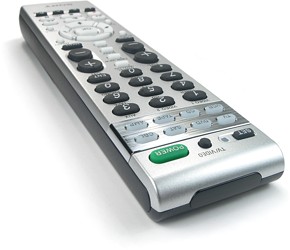
If some concessions had to be made with the physical construction they've been more than repaid in raw feature horsepower under the hood. For $25 the RM-VL600 gets you a lot of remote: 8 devices supporting 39 commands each, a preprogrammed code database, full infrared learning and a dozen macros.
All programming on the RM-VL600 is performed with the [Set] button, and made more intuitive by the 9 LEDs at the top providing feedback on exactly what's happening.
Like all good remotes this model includes a preprogrammed code database that can be used to replace lost or broken remotes - or to simply speed up the setup process. Entering a code is easy: hold [Set] and [Menu] at the same time and the LED next to [Set] will illuminate. Press the device button for which you would like to enter the code and enter the four-digit number as found on the supplement code sheet, followed by [Enter]. The light will go out and the code is saved. At this point the device can be tested for functionality; if it works move on to the next component, otherwise repeat the process with the next code from the insert.
Available device categories in the database include all-in-one home theater systems, analog and digital cable boxes, CD players, DVD players, digital video recorders, HDTV tuners, mini systems, MiniDisc decks, receivers/amplifiers, satellite receivers, tape decks, televisions, VCRs and TV/VCR combos.
As with all recent Sony remotes, it isn't necessary to manually re-assign a component button from one type to the next. For instance, if you wanted to make the [CBL] key a second satellite, just enter the satellite's code number and the remote will do the rest automatically. All component buttons save for [TV] and [AMP] can be made to control any type of device. Own an A/V system with 2 televisions, 3 DVD players, 2 DVRs and a receiver? Not a problem!
Finding the right code.
If you're not interested in sorting through the rather lengthy code sheet or trying out various numbers in the hope of a random match, the RM-VL600 also offers a code search routine. When programming, instead of entering a number on the keypad press [Channel +] to enter search mode, followed by [Power] to test the current code. Keep alternating between those two keys, and when the device responds to the [Power] command press [Enter] to save the code. The remote has a blink sequence to indicate when all codes have been searched through (although it's extremely easy to miss). Additionally, the search process only looks through one code category at a time, so it's necessary to assign the correct type of device to a button using any other brand's code number before starting a search.
The Achilles' heel of Sony's preprogrammed databases in the past is they're generally less complete than others: there are fewer brands covered and often less commands per brand than certain other lines of remotes. But now tangible improvements have been made! Looking back, the relatively recent RM-VL710's DVD category had 27 brands with 61 codes, while the RM-VL600 now has 35 brands with 81 codes. The DVR section has gone from 4 brands and 6 codes to 7 brands and 15 codes. Receivers from 36 brands and 90 codes to 41 brands and 100 codes.
This is the first significant upgrade of Sony's database in quite a few years, and it's most appreciated!
| 









 Enlarge this photo.
 Enlarge this photo.